The Link Skills page is a powerful optimization module in MapleToolkits. Its primary purpose is to help you determine the absolute most efficient combination of link skills for your character.
In MapleStory, you can equip up to 12 link skills (in addition to your character’s own fixed Job Link skill) from a pool of dozens of unique options. Because different link skills provide different types of stats—such as raw damage, critical rate, critical damage, boss damage, or ignore defense—and because many of these stats are subject to diminishing returns, calculating the optimal combination manually is incredibly difficult.
The Link Skills Optimizer automates this process by evaluating every available link skill against your active character profile and target boss, sorting them by their exact Final Damage % (FD%) contribution, and highlighting the optimal setup.
Prerequisites: Select a Character First
Like all efficiency modules in MapleToolkits, the Link Skills Optimizer requires an active character profile to establish your baseline stats and stat efficiency.
If no character profile is loaded, the interface will display a bypass prompt. You can quickly load a profile via the Quick Switch panel docked on the right side of the screen. Once loaded, the optimizer automatically fetches your character’s active job and stats to tailor its calculations.
1. Target Boss Defense Selection
At the top-left of the module, you will find the Boss Defense selector:
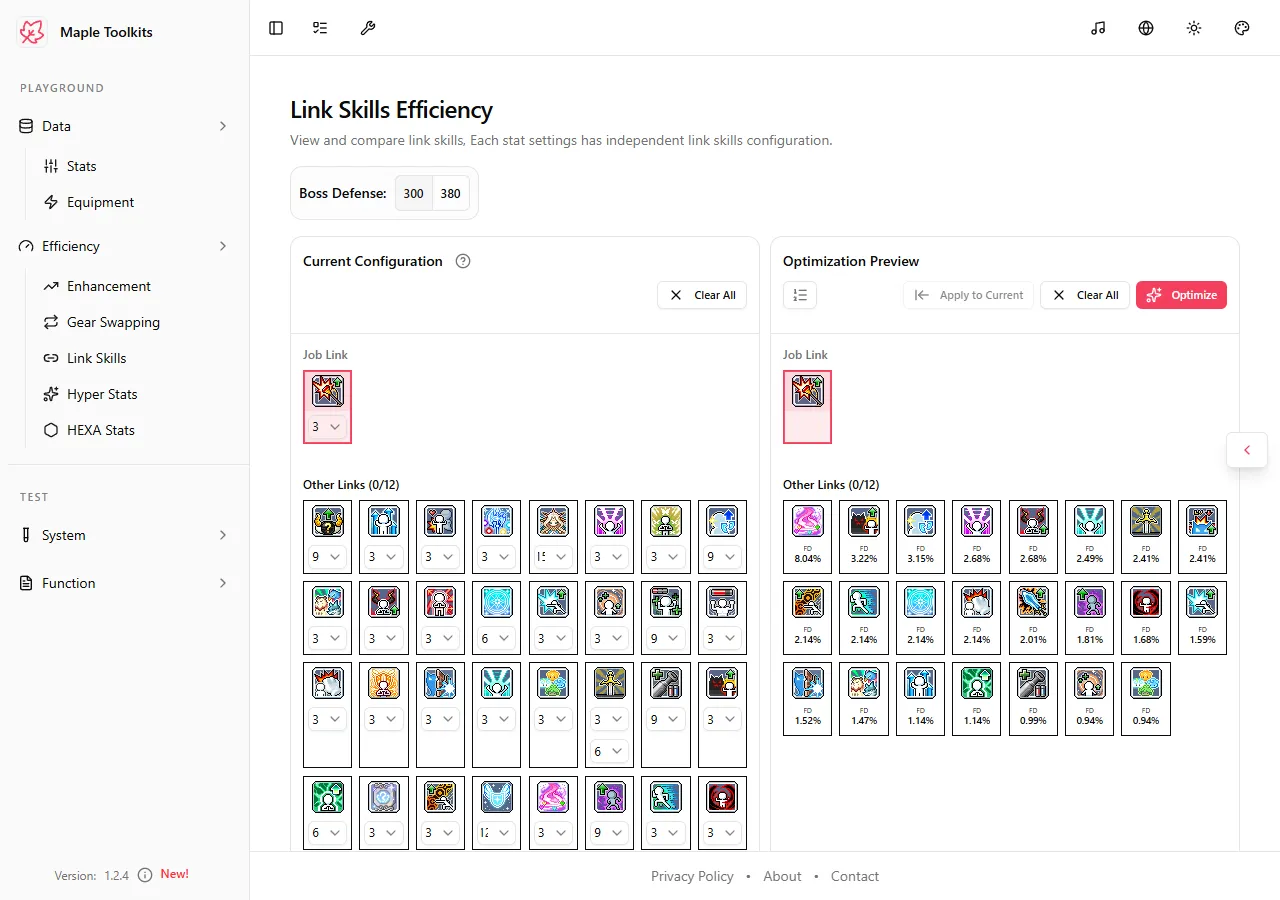 (The main Link Skills interface showing the Boss Defense toggle and available link skills)
- Defense Ratings (300 / 380): Choose between 300% or 380% boss defense rating.
- Dynamic Calculations: The target boss’s defense percentage directly impacts the value of Ignore Enemy Defense (IED). By toggling between 300 (standard hard bosses) and 380 (extreme mode bosses), the calculation engine dynamically adjusts the efficiency of IED-focused link skills (such as Explorer Mage’s Empirical Knowledge or Luminous’s Light Wash), allowing you to see if they outperform raw damage or critical stat skills at higher defense thresholds.
2. Current Configuration Panel (Left Side)
The left side of the workspace displays your Current Configuration, which acts as your setup workshop. It is divided into two primary areas:
2.1 Job Link
Displays your character’s own fixed link skill (e.g., Explorer Thief’s Thief’s Cunning or Dual Blade’s Job Link).
- Fixed Slot: This skill is automatically determined by your active character’s class.
- Level Dropdown: You can select the active level of your job link (typically Level 1, 2, or 3) to reflect your in-game skill tier.
2.2 Other Links Grid
This section houses a comprehensive grid of all 35 available link skills in MapleStory. For every skill card, you can configure the following:
- Level Customization Dropdown: Every link skill card features an interactive level dropdown. You can customize the level of each link skill (e.g., Level 1, 2, 3, or maximum level like 9 for Explorer Mages, 15 for Cygnus Knights, 12 for Resistance, etc.) to match your actual Legion/Link character levels in-game. This ensures the optimizer calculates gains based on your real account progression rather than assuming theoretical maximums.
- Selection State: You can manually toggle or view skills here.
- Clear All: Click the Clear All button in the header to reset your entire custom link configuration.
3. Optimization Preview Panel (Right Side)
The right side of the workspace contains the Optimization Preview panel. This is where the magic happens. By clicking the Optimize button, the tool’s calculation engine runs a comprehensive optimization sequence:
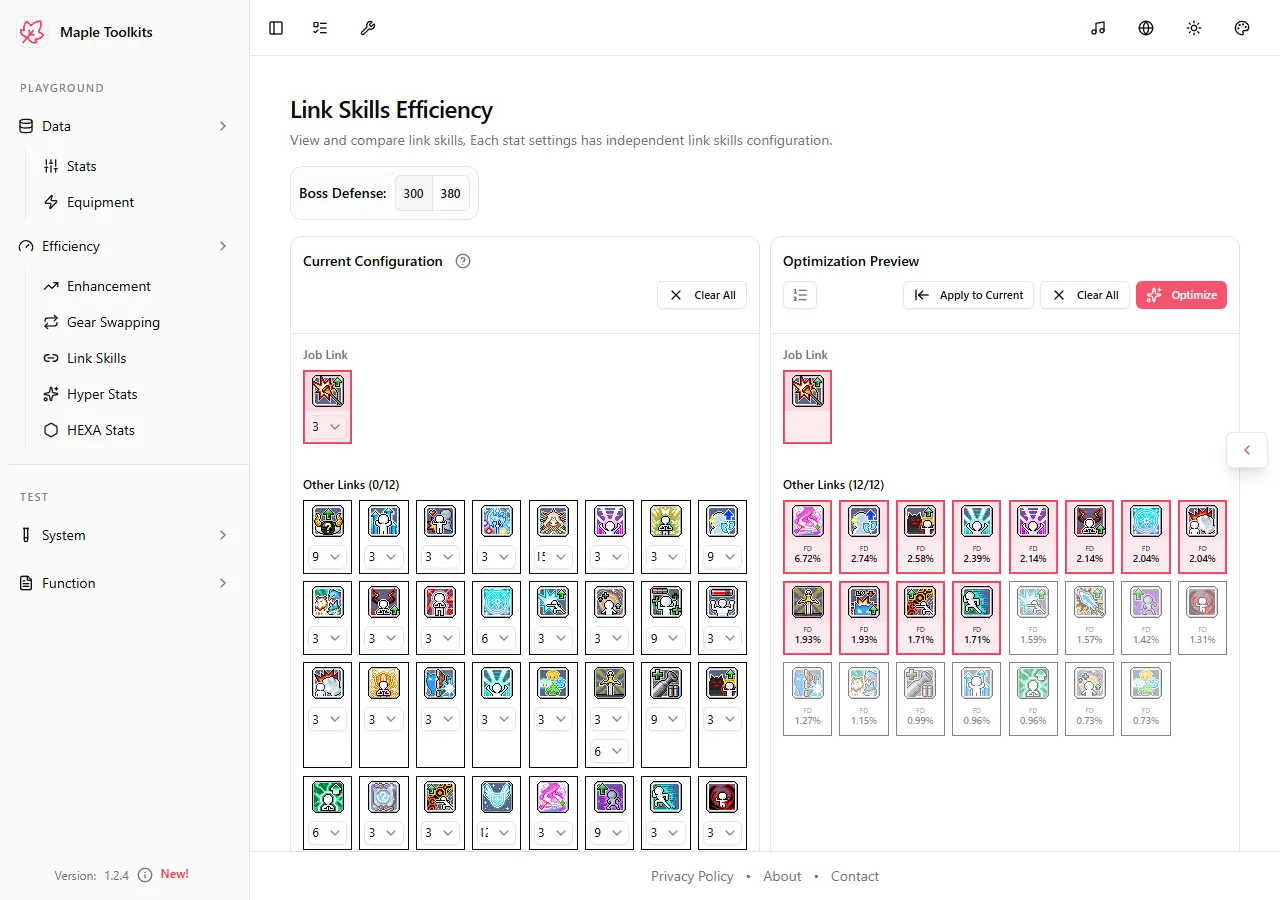 (The Optimization Preview panel showing the top 12 recommended link skills highlighted in red with exact FD% gains)
3.1 The Under-the-Hood Calculation Engine
To ensure absolute mathematical accuracy and properly account for the diminishing returns of stats in MapleStory, the tool utilizes different calculation pathways depending on whether you use Auto Stat Efficiency (ASE) or Custom Stat Efficiency (CSE) (both of which are detailed in the Stats & Stat Efficiency Guide):
A. Auto Stat Efficiency (ASE) Pathway
When using ASE, the engine performs a sophisticated multi-stage calculation to account for stat diminishing returns:
- Deduct Active Link Skills: The engine first deducts all stats and attributes contributed by the currently selected link skills from your character’s active stats.
- Establish Link-Deducted Baseline: With these link stats temporarily removed, the tool establishes a clean, link-deducted baseline for your character.
- Recalculate ASE: The engine recalculates a new Auto Stat Efficiency (ASE) table based on this clean, link-deducted baseline.
- Evaluate and Sort: The tool then evaluates the precise Final Damage % (FD%) contribution of each available link skill using this newly calculated ASE, and sorts them by their exact FD% contribution.
- Identify the Top 12: The engine automatically selects the top 12 most efficient link skills to fill your slots.
NOTE: By recalculating the ASE on a link-deducted baseline, the tool eliminates calculation errors caused by evaluating new link skills against an inflated baseline, ensuring your simulated gains match actual in-game performance.
B. Custom Stat Efficiency (CSE) Pathway
If you choose to use CSE for your comparison, the engine bypasses the dynamic recalculation steps:
- Direct Evaluation: The tool strictly and directly evaluates the attributes of all available link skills using your manually defined, static CSE weights.
- Bypasses Deductions: It compares and sorts the link skills based on their direct CSE weight contributions, without performing link deductions or baseline recalculations.
3.2 Interpreting the Optimization Preview
Once the calculation completes, the panel renders a detailed list:
- Selected Link Skills (12/12): The top 12 recommended link skills are displayed at the top of the list, highlighted with a red border.
- FD% Contribution Badge: Directly below each skill card in the preview, a badge displays the exact calculated Final Damage % (FD%) contribution (e.g.,
6.72%,2.74%) for that specific skill. - Unselected Skills List: Below the top 12, the remaining link skills are shown in grayed-out cards but still display their calculated FD% values. This transparency allows you to see exactly how close other skills (such as Crit Rate or flat stat links) came to making the cut, helping you make informed decisions if you need to swap in utility links (like Resistance’s Spirit of Freedom for invincibility frames).
3.3 Sorting & Visibility Toggle
At the top-left of the Optimization Preview panel, there is a Sorting & Visibility Toggle button:
- Default Mode (Not Selected / White): By default, the list displays skills sorted by their Final Damage (FD%) contribution in descending order. In this mode, any link skills that contribute 0.00% FD are hidden from the list to keep the view focused on active upgrades.
- In-Game Order Mode (Selected / Green): When you toggle this button, the list is rearranged to match the official in-game display order of your link skills. In this mode, skills with 0.00% FD are also displayed. This layout is extremely convenient when you want to copy the recommended setup directly into your game client, as the skills in the preview align perfectly with the layout of your in-game link skills UI.
3.4 Apply to Current
Once you are satisfied with the optimization results, click the Apply to Current button. This will write the optimized link skill configuration directly back to your active character profile in MapleToolkits, automatically updating your character’s stats and stat efficiency across the entire platform.
Access the Live Tool
Ready to maximize your damage output?
👉 Access the Live Link Skills Dashboard
Guide details, assumptions, and verification
Supported scope: MapleStory Global-style Link Skill configurations. Last reviewed: July 20, 2026.
Method: The optimizer evaluates the available skills against the active profile and selected boss-defense setting. It ranks estimated contribution, so its recommendation changes with job, existing stats, skill levels, and whether a player values utility over damage.
Worked example: Set a 300% boss-defense target, enter the levels you actually own, and optimize. Then switch to 380% without changing any other input. If an Ignore Enemy Defense link rises in the ranking, the change reflects the selected target assumption; it does not mean that link is universally best.
Troubleshooting: Confirm that the correct character profile and link levels are active before optimizing. Use the in-game-order view to verify the recommended list before applying it.
Sources and updates: Review official MapleStory notices for Link Skill changes. Update history: July 20, 2026 — added methodology, worked example, and limitations.