The Stats page is one of the core modules in MapleToolkits. It serves two main functions: configuring your character’s stats and calculating/managing your Stat Efficiency. These calculations form the baseline for all optimization tools across the platform, such as Enhancement (WSE potential evaluation), Gear Swapping, and Optimizers (Link Skills, Hyper Stats, HEXA Stats).
1. Stats
The Stats module is designed to collect your character’s raw and buffed attributes, which are then used to calculate your overall attribute efficiency.
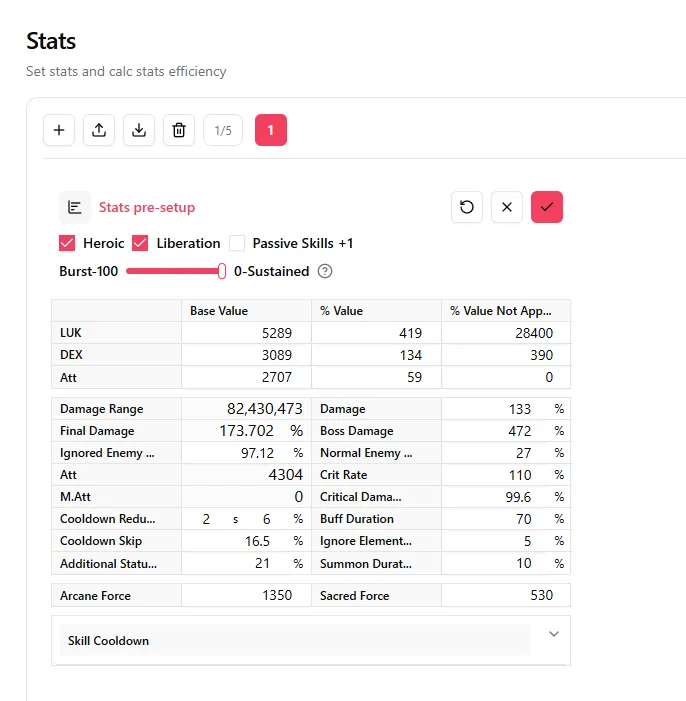
Operation Area
At the top of the interface, you can manage your stats configurations:
- Multiple Stats Sets: You can add, delete, import, or export different stats sets. The system allows you to save up to 5 different sets (convenient if you want to experiment with different setups, though keeping just one per character is perfectly fine!).
- Navigation: Click the Go to Stat Efficiency button to jump directly down to the Stat Efficiency section.
Table Area
Used to input your character’s specific attribute information:
-
Main Table:
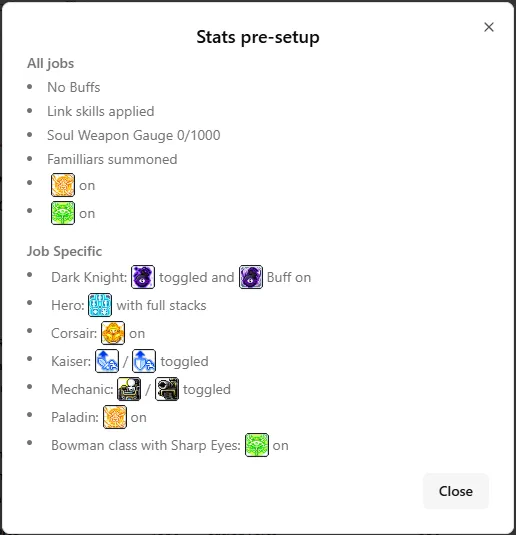
- Open the Stats pre-setup modal to see the requirements (e.g., active toggles/buffs for each job).
- Apply/charge the corresponding toggles or buffs in-game as listed.
- Open your in-game Character Stat window.
- Fill in the values in the corresponding input boxes (Base Value, % Value, and % Value Not Applied).
-
Burst-100 / 0-Sustained Slider: Located above the main table, this horizontal slider controls the ratio used to calculate buff attribute contributions from your Job Skills.
- Sustained Skill Benefit =
stat at trigger coverage (duration / cooldown, max 1) - Burst Benefit =
stat at trigger Damage Breakdown ratio - For detailed calculation examples, click the question mark (?) icon next to the slider.
- Sustained Skill Benefit =
-
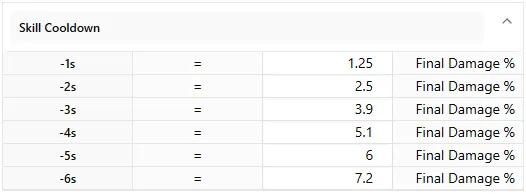
Skill Cooldown Table: Located at the bottom of the main table, this sub-table allows you to input the Final Damage % (FD%) increase gained per second of skill cooldown reduction (from -1s to -6s).
- Tip: Since these values vary by job, they are typically obtained from your job Discord community where theorycrafters calculate them.
- This configuration is essential for quantifying the value of the skill cooldown line when simulating Hat potentials.
Buff Area
Configure the active buffs and skills that take effect in combat.

- Job Skills / Special Rings / In Combat Link Skills:
Skills selected under these three tabs will have their combat attributes factored into your Stat Efficiency calculations:
-
Tooltip Info: Hovering over a skill displays a floating tooltip with a
BurstorSustainedindicator in the top-right corner.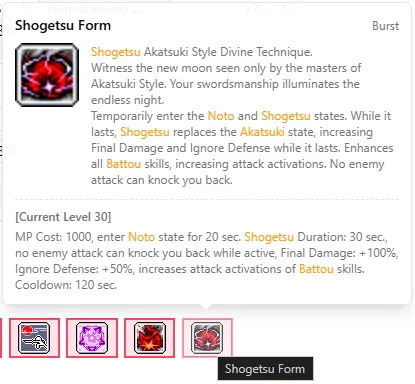
-
Attribute Inspection: Hold the Alt key and hover over a skill to skip the general tooltip and view the exact numeric attributes participating in calculations.
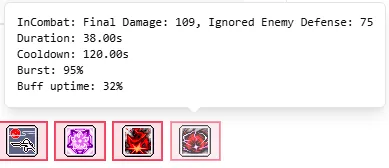
-
HEXA Skills: Certain job skills have HEXA versions (e.g., Hayato’s Shogetsu Form). To configure these, deselect the skill and click it again; a HEXA selection box will appear, letting you choose the upgraded level of the HEXA skill.
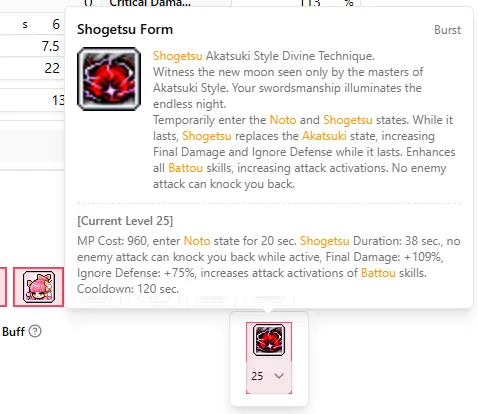
-
In Combat Link Skills: These cannot be directly selected or deselected here. Instead, you must configure them on the Link Skills page. Click the link icon next to the header to jump directly there.
-
- Buffs: Simply check the boxes for the consumable buffs (potions, active items, etc.) that you use in combat. Their stats will automatically be integrated into calculations.
2. Stat Efficiency
Calculated values in this section are updated automatically whenever you modify and save any data in the Stats section.
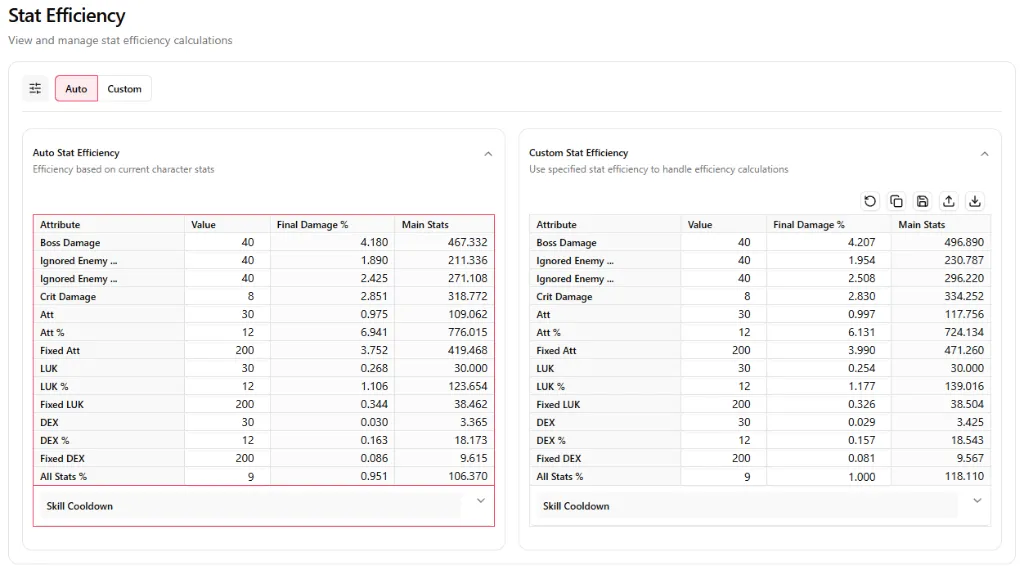
Operation Area
- Auto / Custom Toggle: Easily switch between Auto Stat Efficiency (ASE) and Custom Stat Efficiency (CSE).
- Navigation: Click the Go to Stats button to jump back up to the Stats section.
Table Area
-
Left Table: Auto Stat Efficiency (ASE): Shows the calculated value, Final Damage %, and Main Stat equivalent value for each attribute, dynamically derived from the stats and buffs configured in the Stats section above.
IMPORTANT (How Auto Stat Efficiency is used in Optimizations): In subsequent modules (e.g., evaluating WSE potentials in Enhancement, performing gear diffs in Gear Swapping, or optimizing Link Skills, Hyper Stats, and HEXA Stats), the tool will first deduct the baseline stats of the feature being simulated to calculate a new baseline stats efficiency. It then evaluates the new/alternative attributes using this new baseline.
-
Right Table: Custom Stat Efficiency (CSE): Allows you to manually override and define custom efficiency values for each attribute.
NOTE: Unlike ASE, Custom Stat Efficiency (CSE) evaluates all new attributes directly using the static values you have manually configured, without calculating a dynamic baseline.
Access the Live Tool
Ready to configure your character?
Access the Live Stats Dashboard
Guide details, assumptions, and verification
Supported scope: MapleStory Global-style character configurations. Last reviewed: July 20, 2026. Values and skill behavior can change after a patch; confirm the current game version before relying on a result.
Method: Auto Stat Efficiency starts from the stats and buffs you enter, then converts incremental attributes into a comparable estimated value. Custom Stat Efficiency uses the weights you provide. Neither mode can infer missing buffs, temporary effects, or an incorrect character setup.
Worked example: If a player enters a burst buff as permanently active, the resulting efficiency overstates upgrades intended for sustained damage. Set the Burst/Sustained slider to match the actual use case, save the profile, then compare the Auto and Custom tables. A large difference is a signal to review the assumed weights rather than a guaranteed in-game damage result.
Troubleshooting: Recheck job, level, active buffs, and cooldown values if a result looks implausible. Start with one clean stats set and add effects one at a time.
Sources and updates: Review official MapleStory notices after game updates. Update history: July 20, 2026 added methodology, assumptions, and review guidance.