The Data directory in MapleToolkits serves as the foundation of your character’s profile. Before you can perform any advanced optimizations, you must define and configure your character’s raw attributes and equipment configuration.
Common Modules
Currently, there is one core shared module that coordinates data across the entire platform:
Character Module
The Character Module allows you to create, manage, and toggle profiles for multiple characters. This data is shared globally to ensure you do not have to recreate settings repeatedly.
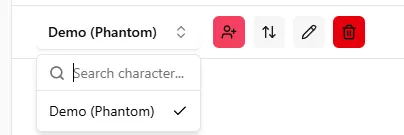
1. Add & Edit
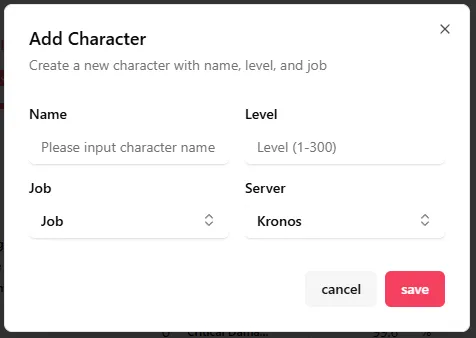
- Custom Character Name: Customize and identify each of your characters.
- Character Level: Directly influences the available point pool for your Hyper Stats configuration.
- Character Job: Determines job-specific active and passive in-combat buffs, which dynamically affect your Stats Efficiency calculations.
- Server/World Selection: Link Skills are shared among characters residing on the same server. Specifying the server allows the tool to automatically sync your Link Skill configurations, eliminating the need to set up link skills from scratch for each character.
2. Reorder & Hide
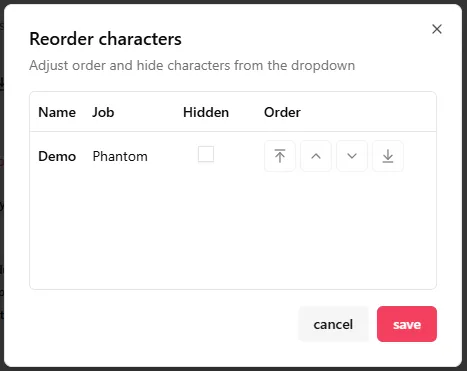
- Custom Reordering: Arrange the display sequence of your characters in the sidebar and dashboard based on your personal preference.
- Hide Profiles: Temporarily deactivate and hide profiles instead of deleting them outright. This keeps your configuration safe for potential future reactivation.
3. Delete
- Complete Removal: Permanently delete and clean up characters you no longer play or track.
Sub-modules
This directory comprises three primary individual modules:
1. Stats
This module serves as the baseline for all optimization tools. It allows you to input your character’s raw and buffed attributes, select active job skills and buffs, and automatically calculate or manually define your Stat Efficiency (ASE/CSE).
- Key Features: Multiple stats sets management (up to 5 sets), Burst-100 / 0-Sustained slider, skill cooldown configuration, combat buff/skill toggles (including HEXA level selection), and Auto (ASE) / Custom (CSE) Stat Efficiency calculations.
- Read Stats Guide
- Access Live Stats
2. Equipment
This module collects your character’s current equipment configuration and enhancement states (Starforce, Flame stats, and Potential ranks/lines), which are then directly utilized in the Enhancement simulation module.
- Key Features: Multiple equipment sets management (up to 5 sets), Calculated Equipment Area with Set 1 fallback/shadowing, active set effects modal, Inventory with screen-capture Gear OCR importing, drag-and-drop swap rules, and an interactive Equipment Details Panel to modify item stats.
- Read Equipment Guide
- Access Live Equipment
3. Familiar
This module manages summon familiar groups and Mystic Frontier card data. It allows you to save familiar option setups, maintain Mystic Familiar Cards, and build reusable three-card Mystic Frontier presets for expedition planning.
- Key Features: Multiple summon familiar groups, three-slot familiar option configuration, Mystic Familiar Card import/export, element and type filters, name/alias/option search, multi-select management, and Mystic Frontier presets.
- Read Familiar Guide
- Access Live Familiar