The Familiar page is the central place to manage familiar-related data in MapleToolkits. It has two connected purposes: saving the familiar options you use for normal gameplay, and preparing Mystic Frontier card data that can be reused in expedition planning.
Because familiar setups often change between bossing, farming, healing, and utility scenarios, this page is designed as a compact workspace for keeping multiple configurations organized instead of rebuilding them from memory each time.
1. Summon Familiars
The Summon Familiars section lets you create and manage familiar groups for regular familiar usage.
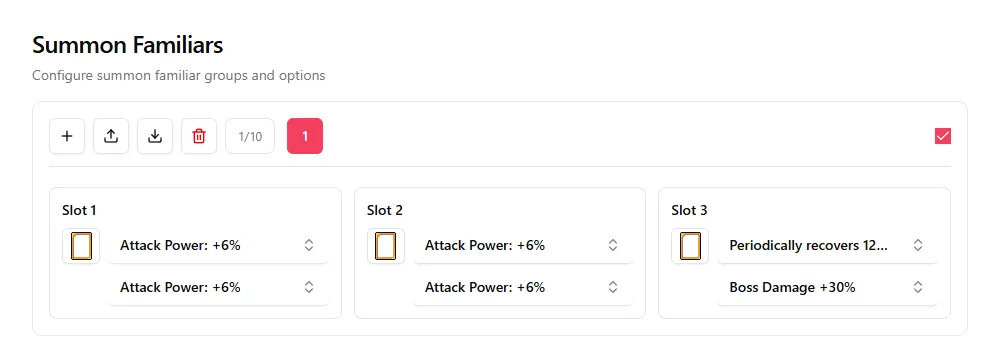
Operation Area
At the top of the section, you can manage your familiar groups:
- Multiple Familiar Groups: Add new groups to keep different familiar setups separated.
- Import / Export: Back up a familiar group or move it between browsers and devices.
- Delete Current Group: Remove the currently selected familiar group when it is no longer needed.
- Group Tabs: Switch between saved groups from the numbered tabs.
Familiar Slot Area
Each summon familiar group contains three familiar slots. For every slot, you can configure:
- Rank: Select the familiar rank for that slot.
- Option Lines: Choose the familiar options assigned to the slot, such as Attack Power, Boss Damage, healing, or other utility lines.
The checkbox in the Summon Familiars section controls whether the current Summon Familiars set is automatically added before calculating Auto Stat Efficiency (ASE). For more details about ASE, see the Stats & Stat Efficiency Guide.
When this checkbox is selected, you do not need to activate the Summon Familiars skill in-game while filling out the Stats page table. During ASE calculation, MapleToolkits automatically adds the current Summon Familiars set attributes into the calculation.
2. Mystic Frontier
The Mystic Frontier section stores the card data used by the Familiar Expedition tool. It is split into two main areas: Mystic Familiar Cards and Presets.
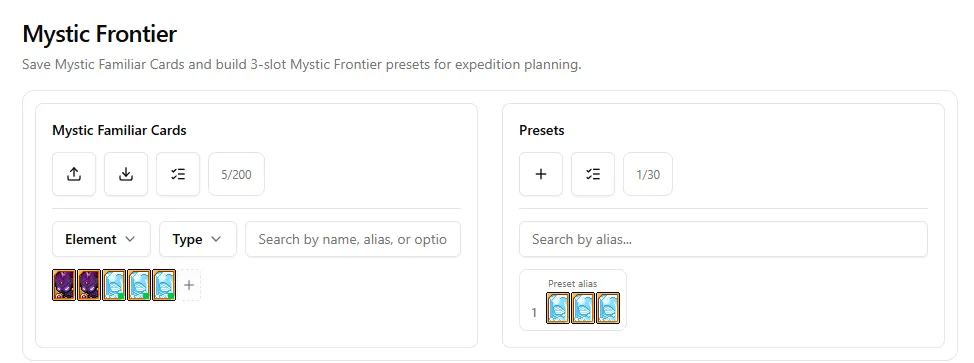
Mystic Familiar Cards
This area works as your card library. You can save Mystic Familiar Cards and quickly narrow the list when planning expeditions.
Key controls include:
- Import / Export: Back up or transfer your Mystic Familiar Card list.
- Multi-Select: Remove multiple saved cards more efficiently.
- Element Filter: Filter cards by their elemental category.
- Type Filter: Filter cards by familiar type.
- Search: Search by name, alias, or option text.
- Add Familiar: Add a new Mystic Familiar Card to the library.
Each saved card can include useful identity and option data, allowing the expedition calculator to understand which cards are available for matching.
Presets
The Presets area lets you save three-card Mystic Frontier lineups.
Use presets when you already have a lineup you want to reuse, compare, or send into expedition scoring. You can search presets by alias and use multi-select tools to manage saved lineups in bulk.
3. Connection With Familiar Expedition
The Familiar page and the Familiar Expedition page are designed to work together.
The recommended workflow is:
- Save your Mystic Familiar Cards in the Familiar page.
- Build reusable three-card Mystic Frontier presets.
- Open Familiar Expedition to calculate dice outcomes or match better card combinations.
- Return to the Familiar page whenever your card inventory or saved presets change.
This keeps your familiar data in one place while still allowing the expedition calculator to use it for deeper planning.
Access the Live Tool
Ready to organize your familiar setups?
Access the Live Familiar Dashboard