The HEXA Stats page is a powerful optimization module in MapleToolkits. Its primary purpose is to help you determine the absolute most efficient allocation of stats and levels for your character’s HEXA Stat cores.
Introduced in the 6th Job Advancement, HEXA Stats provide massive stat boosts, but optimizing them is notoriously difficult. Because of the RNG-based upgrade system, the diminishing returns of critical stats like Boss Damage, Damage, and Ignore Enemy Defense, and strict in-game slot constraints, finding the optimal setup requires advanced calculations. The HEXA Stats Optimizer automates this process by evaluating every stat combination against your active character profile and target boss, recommending the mathematically perfect setup to maximize your Final Damage % (FD%).
Prerequisites: Select a Character First
Like all efficiency modules in MapleToolkits, the HEXA Stats Optimizer requires an active character profile to establish your baseline stats and stat efficiency.
If no character profile is loaded, the interface will display a bypass prompt. You can load a profile via the Quick Switch panel docked on the right side of the screen. Click the floating panel toggle arrow on the right margin to open the Quick Switch menu, select your character, and the optimizer will automatically fetch your active stats.
1. Core Interface Selectors
At the top of the module, you will find two key configuration selectors:
- Stat Node: A dropdown menu that allows you to select the number of active HEXA Stat nodes you want to configure and optimize (supporting up to 3 active nodes). Toggling this number dynamically adds or removes node configuration tables in both the Current Configuration and Optimization Preview panels.
- Boss Defense: Choose between
300%and380%defense ratings. This rating dynamically affects the calculation of Ignore Enemy Defense (IED), allowing the optimizer to adjust the value of IED stats based on the defense threshold of your target boss.
2. Current Configuration Panel (Left Side)
The left side of the workspace displays your Current Configuration, representing your character’s active HEXA Stat setup.
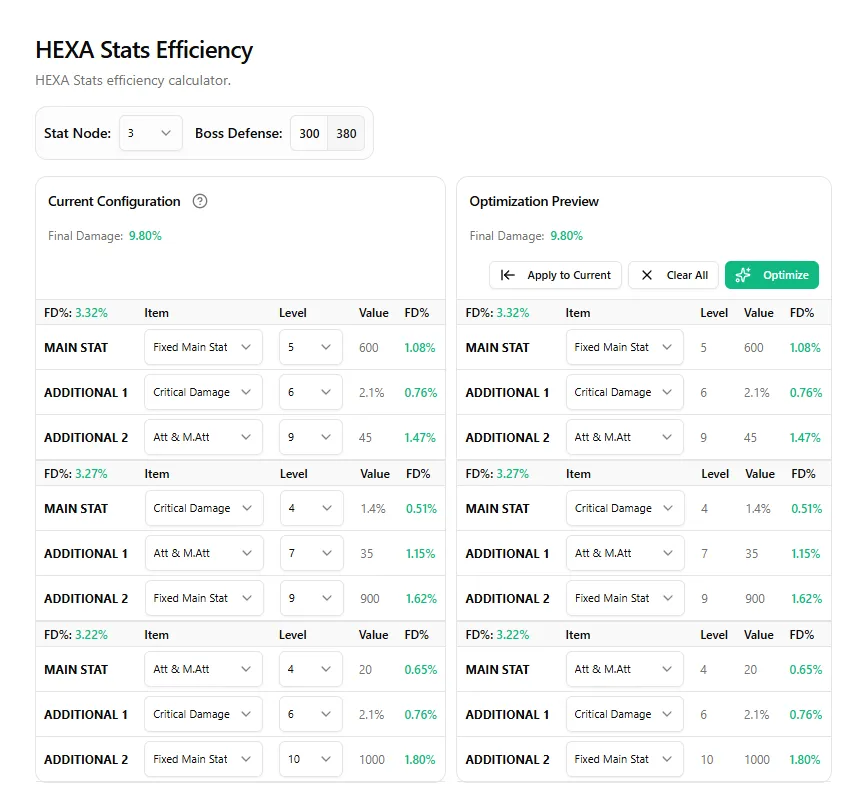 (The main HEXA Stats interface showing the node configuration tables and selectors)
2.1 Node Structure
Each active HEXA Stat node is represented by a table with three distinct stat slots:
- MAIN STAT: The primary slot of the core. It can be set to Critical Damage, Boss Damage, Ignore Enemy Defense, Damage, Attack/Magic Attack, or Main Stat.
- ADDITIONAL 1: The first additional slot. It can be set to any of the remaining stats in the pool.
- ADDITIONAL 2: The second additional slot. It can be set to any of the remaining stats in the pool.
2.2 Level Customization
- Dropdown Menus: Each slot has a dropdown to select its active level (from
0to10). The tool calculates the stat values based on these levels, displaying them in the Value column. - Individual FD%: The rightmost column of the table displays the exact Final Damage % (FD%) contribution of each individual slot.
- Combined FD%: The header of each node table displays the combined FD% contribution of that specific core. The overall Final Damage contribution of all active cores combined is rendered at the top of the panel.
3. Optimization Preview Panel (Right Side)
The right side of the workspace contains the Optimization Preview panel, which calculates and displays the mathematically optimal setup.
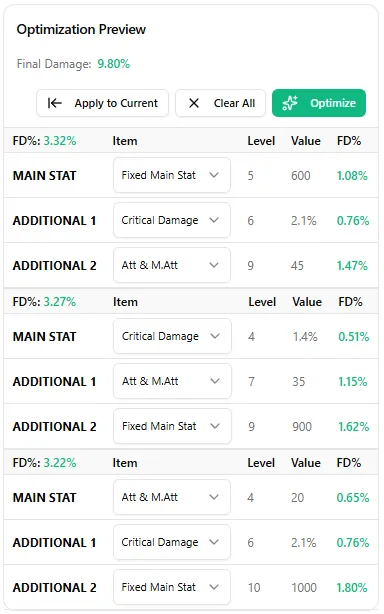 (The Optimization Preview panel displaying the mathematically optimal stat and level distribution)
3.1 The Optimization Engine
When you click the Optimize button, the tool’s calculation engine runs a comprehensive optimization sequence to find the highest possible Final Damage gain.
A. Optimization Logic & Constraints
Unlike other systems, the HEXA Stats optimizer does not change your core levels. Because core level distribution (the levels of your Main Stat and two Additional Stats) is determined by in-game RNG upgrade rolls, the optimizer respects your active configuration:
- Level Conservation: The levels of the three slots (Main, Additional 1, Additional 2) on the optimized side are kept strictly identical to your current configuration on the left.
- Stat Assignment Shuffling: The optimizer shuffles and redistributes the stat types (e.g. Critical Damage, Boss Damage, Att/MAtt, etc.) across your existing slot levels to find the combination that yields the highest Final Damage % (FD%) gain.
- Uniqueness Constraints: In accordance with official game rules, a specific stat (such as Critical Damage or Boss Damage) can only be set as the Main Stat on one active core across your entire equipped setup. The optimizer automatically distributes stat types across multiple nodes to comply with this constraint while maximizing your damage.
B. Calculation Pathways
To ensure absolute mathematical accuracy, the engine utilizes two distinct calculation pathways depending on your active profile settings:
- Auto Stat Efficiency (ASE) Pathway: The engine first deducts all stats contributed by your current HEXA Stat setup, establishes a clean baseline, recalculates your dynamic stat efficiency (ASE) table, and then evaluates all possible stat allocations against this clean baseline. This eliminates calculation errors caused by evaluating upgrades against an inflated baseline.
- Custom Stat Efficiency (CSE) Pathway: The engine directly evaluates and compares stat allocations using your manually defined, static CSE weights without performing baseline recalculations.
3.2 Action Buttons
- Optimize: Triggers the calculation engine to find and display the optimal configuration.
- Clear All: Resets the level and stat selections in both panels back to zero.
- Apply to Current: Writes the optimized configuration directly back to your active character profile in MapleToolkits, saving the setup and updating your character’s stats globally across the platform.
Access the Live Tool
Ready to maximize your HEXA Stat layout?
👉 Access the Live HEXA Stats Dashboard